
Quick answer
How do you migrate from Greenhouse ATS without losing data or hiring quality?
A safe Greenhouse migration has five phases: define the export scope and retention constraints; export candidate data and attachments using the appropriate documented route; map records and stages; rebuild the configuration that cannot transfer as data; then test representative records and active roles before cutover. The timeline depends on the data, integrations, configuration, internal ownership and testing scope, so do not treat a generic estimate as a commitment.
- Export scope: confirm the permissions, data-retention state, records and attachments you need before starting
- API diligence: use Harvest v3 guidance; confirm authentication, endpoint scope and rate-limit behavior before building tooling
- Attachment handling: download and validate files during the migration rather than treating access links as permanent records
- Methodology risk: document interview criteria, scorecards and workflow rules so they can be rebuilt deliberately in the destination
- Commercial decision: obtain the current Greenhouse renewal terms and the destination's first-year implementation scope in writing
Migration decision framework at a glance
Before starting, confirm three things: you have the access and technical owner needed to use the current Greenhouse export or Harvest API route; you know which retention rules affect the records you expect to export; and your target ATS can demonstrate the interview, scorecard and reporting workflows your team requires.
| Migration phase | Key action | Primary risk if skipped |
|---|---|---|
| Pre-migration audit | Document integrations, GDPR retention settings, attachment count, interview kit inventory | Discovering expired candidate data, missing files, or unknown integrations mid-migration |
| Data export | Use the documented Greenhouse export or API route for your approved scope; retain attachment files with their records | Missing records or attachments because access links and permissions were not validated |
| Stage and field mapping | Map Greenhouse Candidate + Application objects; handle parent-child relationships explicitly | Silent relational data loss when flattening to CSV; applications in wrong stages |
| Configuration rebuild | Rebuild interview kits, pipeline stages, approval workflows, email templates | Methodology regression, team reverts to informal evaluation without scorecard structure |
| Pilot import and cutover | Import a representative sample; run an end-to-end workflow test; agree the active-role cutover plan | Going live on an untested configuration and discovering mapping errors under production pressure |
Sources: Greenhouse API overview and v3 transition | Greenhouse data retention rules | Harvest API rate limiting
Why teams leave Greenhouse, and what to be honest about
Greenhouse's public pricing page asks buyers to request a quote. That means a migration decision should be based on the actual renewal proposal, the planned destination cost and the work needed to move safely, not on third-party price estimates.
Compare the commercial scope line by line: subscription, implementation, integrations, optional services, data-export support, renewal terms and cancellation or notice requirements. Ask each vendor to state what changes when your hiring volume, employee count or product requirements change.
Also protect the hiring practice that matters to your team. Candidate data can be exported or mapped, but interview criteria, scorecard guidance, workflow rules, permissions and reporting definitions need deliberate reconstruction and validation in the destination system.
Methodology and sources
This guide uses Greenhouse's public retention, Harvest v3 and import documentation checked October 9, 2026. Technical statements are separated from recommended planning checks. Greenhouse's import guides concern migration into Greenhouse; they are not instructions for exporting a complete account to another ATS. This is not a completed-customer-migration case study or a guaranteed timeline, cost or product outcome. Treegarden sells ATS software and has a commercial interest in buyers considering a migration.
Primary sources: Greenhouse API overview · Harvest v3 endpoint changes · Greenhouse data retention configuration · Harvest API rate limiting reference · Greenhouse bulk candidate import guide
Phase 1: Pre-migration audit, what to document before you touch anything
Start by documenting the source data, access, retention rules and destination requirements. The audit is complete when the owners agree on export scope and acceptance checks, not when a fixed number of days has elapsed.
Step 1.1, Check your data retention configuration first
Greenhouse lets you configure data retention rules that govern when candidate personal data should be removed. Per Greenhouse’s own support documentation, the retention timer starts once a candidate is hired or rejected on all of their applications, and it applies retroactively to existing hired and rejected candidates. Rejected-candidate rules are configurable per office; hired-candidate rules apply organization-wide and cannot be set per office. When the timer lapses, a designated user is notified by email that the candidate’s personal data should be deleted, and the specific fields removed are whatever you selected in the rule. One nuance that matters for talent pooling: if a rejected candidate is later added to a new pipeline, Greenhouse deactivates and resets that candidate’s timer.
If retention rules apply, historical records may have personal data removed or be awaiting deletion. Check affected fields, offices and retention periods before defining your export scope; record counts alone do not confirm that the necessary information remains. Do not expand retention merely to make an export look complete.
Step 1.2, Integration inventory
Document every integration connected to your Greenhouse account. The categories to cover: job board syndications (LinkedIn, Indeed, Glassdoor, etc.); HRIS connections (Workday, BambooHR, Personio, etc.); background check providers; video interview platforms; calendar integrations; assessment tools; and any custom webhook or API integrations your engineering team built directly. For each integration, record three things: how frequently it is used by the team in active workflows; whether your target ATS has a native equivalent; and what breaks immediately at cutover if this integration stops working.
Evaluate the connections your team uses, not marketplace size. Ask the destination to demonstrate the required HRIS handoff, calendar behavior, job-board delivery and partner integrations. A similarly named integration can have different supported fields, sync direction, permissions or failure handling.
Explicitly ask your engineering team whether any custom integrations exist that are not in the official Greenhouse integration panel. Custom webhooks that post candidate events to Slack, Zapier automations built on Greenhouse triggers, or internal tools that read from the Harvest API are often completely unknown to the HR team. They all stop working when Greenhouse access ends.
Step 1.3, Attachment inventory and export strategy
Run a count of candidate attachments in your Greenhouse account: resumes, cover letters, portfolio files, and signed offer documents. This number drives the resource and time estimate for the attachment portion of the export.
The v3 endpoint guide moves attachments out of the candidate response into a separate endpoint. Verify document access during the pilot, retain permitted files in a secure archive and map each file to the correct record. Do not assume a URL is a permanent copy or reuse a legacy URL-expiry rule without checking the current endpoint.
Step 1.4, Interview kit documentation export
Document each required interview kit: role, stage, competencies, questions, rating anchors and interviewer guidance. Confirm how the destination will recreate or map these elements. Being able to retrieve configuration does not establish that another ATS can import it as a working interview kit.
If your team has a substantial interview-kit library, assign the rebuild explicitly to an experienced recruiter as a dedicated workstream with its own estimate and acceptance checks. Do not treat it as a background task.
Pre-migration audit checklist
Before any data leaves Greenhouse, you should be able to tick every item below. If you cannot, you are not ready to export, you are ready to discover a problem mid-migration.
- Retention rules reviewed: which offices have rejected-candidate rules, the retention period, and exactly which fields each rule deletes are all documented.
- Realistic export scope confirmed against those rules, with sign-off if you are adjusting any rule for the export window.
- Integration inventory complete, with a third column recording what breaks at cutover for each integration, not just whether it exists.
- Engineering explicitly asked whether any custom webhooks, Zapier flows, or internal tools read from or write to Greenhouse outside the integrations panel.
- Attachment count checked, current endpoint access tested and permitted files mapped to their candidate or application records.
- Every interview kit documented to rebuild specification: stage, competencies, questions, rating scale anchors, and interviewer guidance.
- Custom fields catalogued: name, type, object (Candidate, Application, or Job), and whether each drives reporting or filtering.
- Harvest access, authentication method and any third-party export tooling confirmed against the current Greenhouse documentation.
- A secure, encrypted, access-controlled location chosen for the export archive, with a deletion plan for working copies.
- Data processing agreement and data residency confirmed with the destination vendor before any real candidate data is loaded.
- Open data subject (access or deletion) requests logged so they can be reconciled on both sides after cutover.
Phase 2: Data export, what the Harvest API actually gives you
Greenhouse's API overview states that Harvest v1 and v2 became unavailable after August 31, 2026. Use the current v3 documentation when scoping an outbound migration. An API resource being readable does not mean it is included in one export or supported by your destination importer.
Build an export inventory, not an assumed full-account dump
- People and applications: confirm the fields needed to reconnect a person to each job application.
- Stage history and rejection data: validate timestamps, reason mappings and the historical depth available to your account.
- Feedback and interviews: agree whether imported material will be searchable history or native destination records.
- Jobs, offers and approvals: validate required fields and relationships; do not assume every historical action transfers.
- Users and access: map identities separately from destination permissions.
- Notes, custom fields and documents: reconcile each required field and file against the source, with exceptions recorded.
The v3 resource mapping splits some previously nested data across endpoints. Candidate-to-application links, attachment access and stage names require explicit joins. Ask the technical owner to show a representative reconstructed record before approving the full export.
Retrieving configuration is not the same as transferring its behavior
Separate historical data from the configuration that runs your hiring process. Greenhouse documents v3 resources for stages, approval flows and email templates, but that does not demonstrate compatibility with another ATS. Record what must be rebuilt, what can be mapped and what will remain reference-only.
- Interview kits: demonstrate the criteria, questions, rating guidance and feedback review in the destination.
- Pipelines: agree stage names, ordering and associated actions before importing active applications.
- Approvals: distinguish historical approval evidence from the rules that route a new request.
- Email workflows: review text, triggers, recipients and merge fields before enabling destination automation.
Harvest API mechanics that shape your export tooling
Authentication. The v3 authentication guide specifies OAuth: Client Credentials for custom integrations and Authorization Code for partner integrations. Confirm scopes, authorizing-user permissions and token renewal. Do not build new tooling around retired v1/v2 credentials.
Rate limiting. The current guide describes 30-second API windows and separate 60-second token-request windows. Monitor X-RateLimit-Limit, X-RateLimit-Remaining and X-RateLimit-Reset; respect Retry-After on HTTP 429. Check and log every response instead of counting failed requests as exported records.
Pagination and final reconciliation. Harvest v3 uses cursor pagination: follow the next URL from each response's Link header until none remains. Test supported filters for each endpoint rather than assuming a universal updated-after filter. Agree how changes made during the export will be captured and reconciled before cutover.
Pull objects in dependency order. Export the reference objects first, users, offices, departments, jobs, and job stages, then candidates and applications, then the child records (scorecards, scheduled interviews, activity feed, offers, attachments). Mapping at import is far simpler when the parent IDs already exist; a scorecard or interview that references a user or application you have not imported yet has nothing to attach to.
Implementation compatibility. Before building or buying migration tooling, confirm the currently supported Harvest API authentication, endpoint behavior and rate limits in Greenhouse documentation. Ask a third-party migration provider or internal engineering owner to demonstrate the exact export path before it is used with production candidate data.
Handling candidate PII during the export, the part most playbooks skip
The moment you run a Harvest export you create a large, portable file of candidate personal data, names, emails, phone numbers, resumes, interview notes, sitting outside both ATS platforms. Under GDPR and similar regimes this is still processing, and you are still the controller, so the export archive needs the same care as the live system, not a folder on someone’s laptop. A few concrete practices that keep a migration defensible:
- Treat the export as a regulated data store from the first byte. Write it to an access-controlled, encrypted location, restrict it to the named people running the migration, and delete the working copies once the import is validated. Do not email candidate files around or drop them in a shared chat channel.
- Confirm a data processing agreement with the destination vendor before you load real data. If the new ATS or its migration service touches your candidate records, they are acting as a processor; the DPA, and where relevant their sub-processor list and hosting region, should be in place before the first production import, not after.
- Check data residency if it matters to you. If your candidates are in the EU or UK and your policy or customers require EU or UK data residency, verify where the destination platform stores data before committing, this is a question to answer in vendor selection, not at go-live.
- Do not silently widen retention. If Greenhouse rules were about to remove certain records, importing them into a new system with no equivalent rule quietly extends how long you hold that personal data. Carry your retention policy across with the data, and make sure the new ATS can enforce it.
- Keep your candidate privacy notice honest. If your notice told candidates which systems hold their data, a new processor and a new location may need to be reflected. Loop in whoever owns your privacy notices and your record of processing activities.
- Respect open data subject requests across the gap. A deletion or access request that arrives mid-migration must be honoured in both the source export and the destination, not lost in the handover. Track any open requests before you start and reconcile them after cutover.
None of this is exotic, but it is the difference between a migration that would survive a data protection review and one that created an unmanaged copy of every candidate you have ever spoken to. This is general operational guidance rather than legal advice; if you are in a regulated sector or unsure of your basis for processing, run the plan past your DPO or counsel.
Phase 3: Data mapping, stages, fields, and the parent-child object problem
Preserve the distinction between a candidate and that person's applications to different jobs. A flat file can lose these relationships if source identifiers and destination mappings are omitted; CSV itself does not inevitably destroy them. Agree which identifiers, linked records and timestamps your importer needs, then validate a person with multiple applications in the pilot.
Ask the destination to demonstrate its supported import format and reconciliation process. Neither an API import nor a spreadsheet import guarantees coherent history without correct mappings. Document any information that will remain in a reference archive instead of becoming native destination data.
Stage name mapping
Before import, map every required Greenhouse stage to an agreed destination stage. Similar labels do not establish equivalent behavior. Verify ordering, interview requirements, notifications and terminal states using test applications.
| Common Greenhouse stage name | Stage type | Mapping action for target ATS |
|---|---|---|
| Application Review | Initial inbox screening | Map to first review stage; verify no auto-rejection rules conflict with historical records |
| Recruiter Phone Screen | First live contact | Create matching stage; note interview type for interview kit rebuild |
| Hiring Manager Review | Manager involvement gate | Confirm target ATS triggers correct hiring manager notification at this stage |
| Take-home Assessment | Skills assessment | Check whether target ATS has native assessment integration or requires a manual handoff |
| Technical / On-site Interview | Structured interview | This is where interview kit rebuild matters most, verify kit structure exists before any live roles reach this stage |
| Executive Interview | Final round | Confirm approver notification flow works correctly at this stage in the new system |
| Offer | Offer management | Verify offer approval workflow is fully rebuilt before any live role reaches offer stage post-cutover |
| Hired / Rejected | Terminal states | Confirm rejection reason codes map correctly for EEOC disposition reporting requirements |
Custom field mapping
Document every custom field in your Greenhouse configuration: field name, field type (text, select, multi-select, date, number, yes/no), which object it lives on (Candidate, Application, or Job), and whether it is actively used in reporting or filtering. Create an explicit mapping to the equivalent field in the target ATS, or flag it for recreation as a new custom field. Custom field data that does not map correctly on import is either silently dropped or stored in a generic text field, both outcomes break downstream reporting or candidate filtering that depends on that data. Discover this in the pilot import, not in production.
Phase 4: Rebuilding in the target ATS and running the import
With your data exported and your mapping documented, configure the destination before running the import. Importing candidate data into an unconfigured ATS produces records with no stage definitions, no hiring team assignments, and no interview kit context. Correcting that retroactively is significantly harder than setting up configuration first and importing into a ready system.
Re-creating your job pipelines in the new ATS
Start with pipeline configuration. Create the stages you documented in your mapping table, in the correct order, with the correct stage types. If your target ATS supports stage-level settings, interview type, required scorecard completion before a candidate can advance, automated notifications to hiring managers at specific stages, configure those now, before any candidates are in the system.
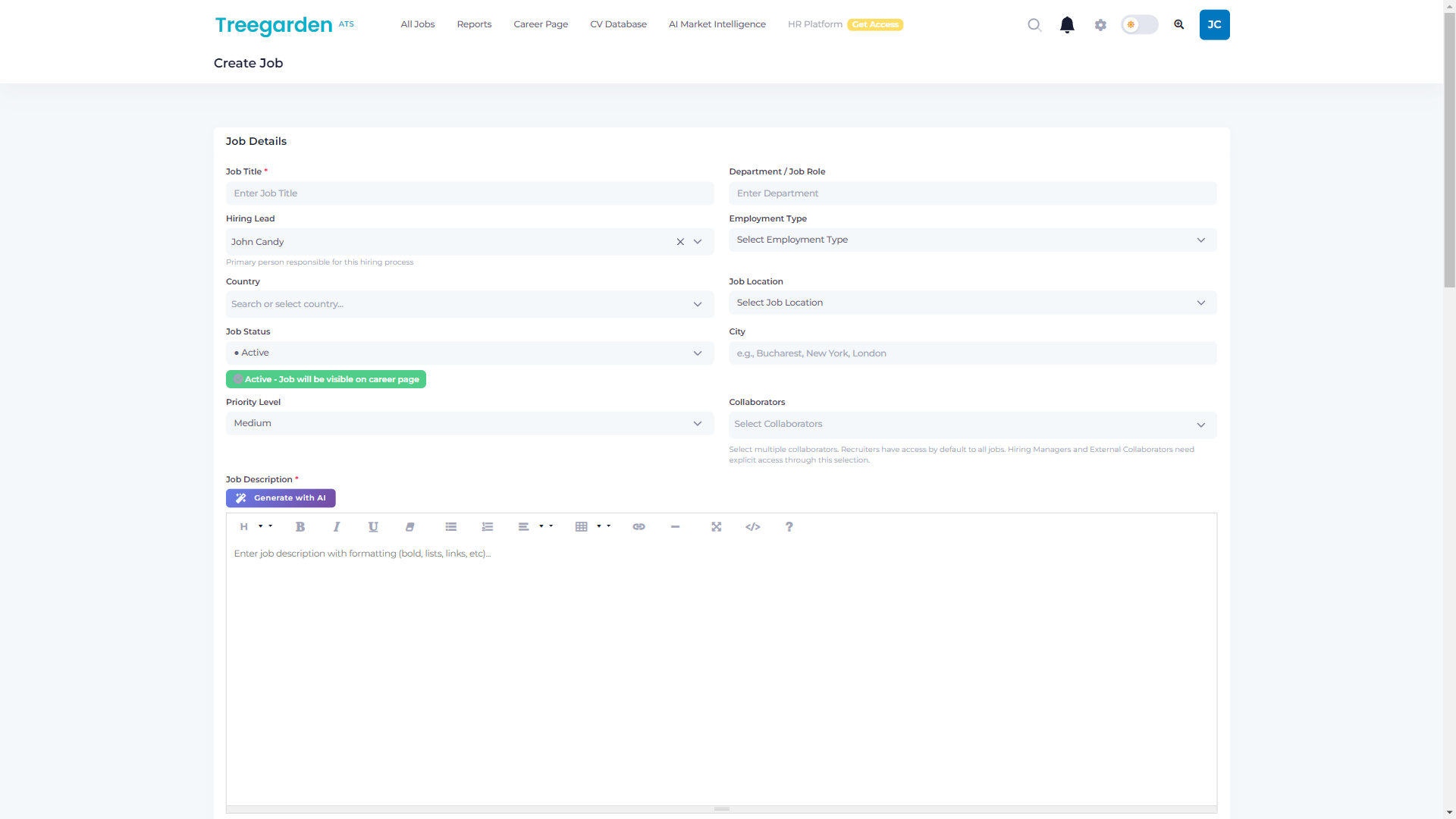
For each active role you are migrating, recreate the job configuration systematically: job title, department, hiring lead, employment type, location, status, and collaborator access. Set these up before the candidate import so that applications land inside properly configured job records from day one, not into a generic unconfigured inbox.
Rebuilding interview kits
Use the interview kit documentation you exported in Phase 1 as your rebuild specification. For each kit: create the competency sections in the target system, add the specific questions under each competency, configure the rating scale with labelled anchors, and add interviewer guidance notes. Confirm that an interviewer can access the kit during an interview and submit their scorecard without ambiguity about where to find the form or how ratings are defined.
Review each kit for outdated questions and unclear scoring guidance. Treat improvements as explicit scope with an owner and acceptance check; they can add work and should not delay essential cutover validation unexpectedly.
User accounts and permission structure
Create user accounts for every team member before go-live. Configure permissions carefully: recruiters need full candidate management access across the roles they manage; hiring managers need access to their assigned roles and scorecards but should not see roles they are not assigned to; external collaborators (agency recruiters, hiring advisors) may need restricted access to specific pipelines only. The permission granularity varies significantly between ATS platforms, verify that the target system’s permission model maps coherently to the role structure you had in Greenhouse, rather than assuming it will.
Importing candidates and CVs
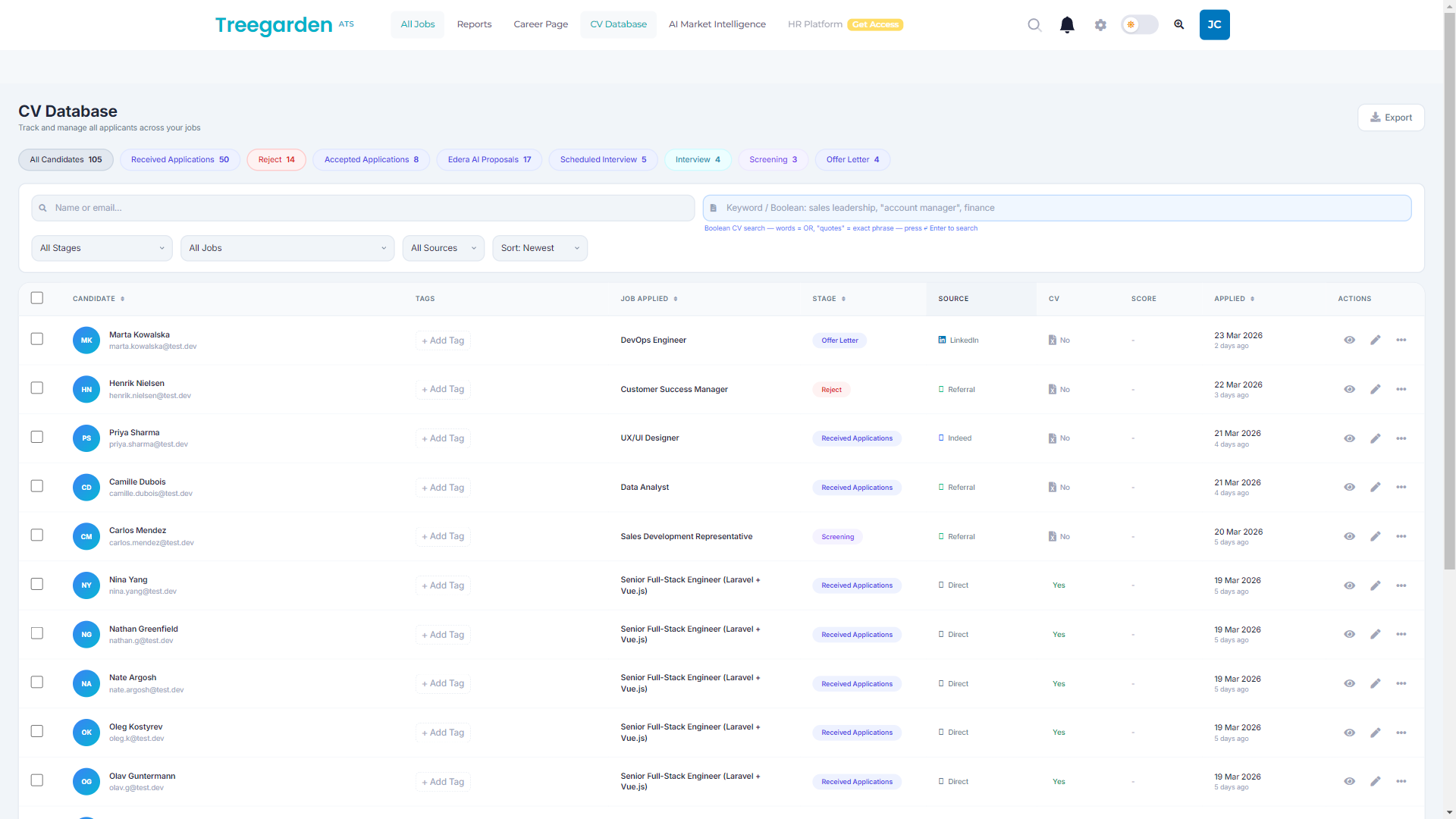
Run the import in two passes. Start with a representative pilot covering different job types, stages, time periods and records with and without attachments. Verify the mapped fields, stage history, documents and rejection data against the source before importing the full dataset. Correct systematic mapping issues while the scope is small.
Second pass: import the agreed full dataset. After completion, repeat the verification checks on a representative sample from different periods and job types before telling the team that the data is ready.
Phase 5: Parallel run, go-live, and closing Greenhouse
Decide the cutover approach from the active-role risk, data scope and contractual access window. A parallel or read-only period can reduce disruption, but its duration and the treatment of late-stage candidates should be agreed by the recruiting, legal, IT and vendor owners rather than copied from a generic timetable.
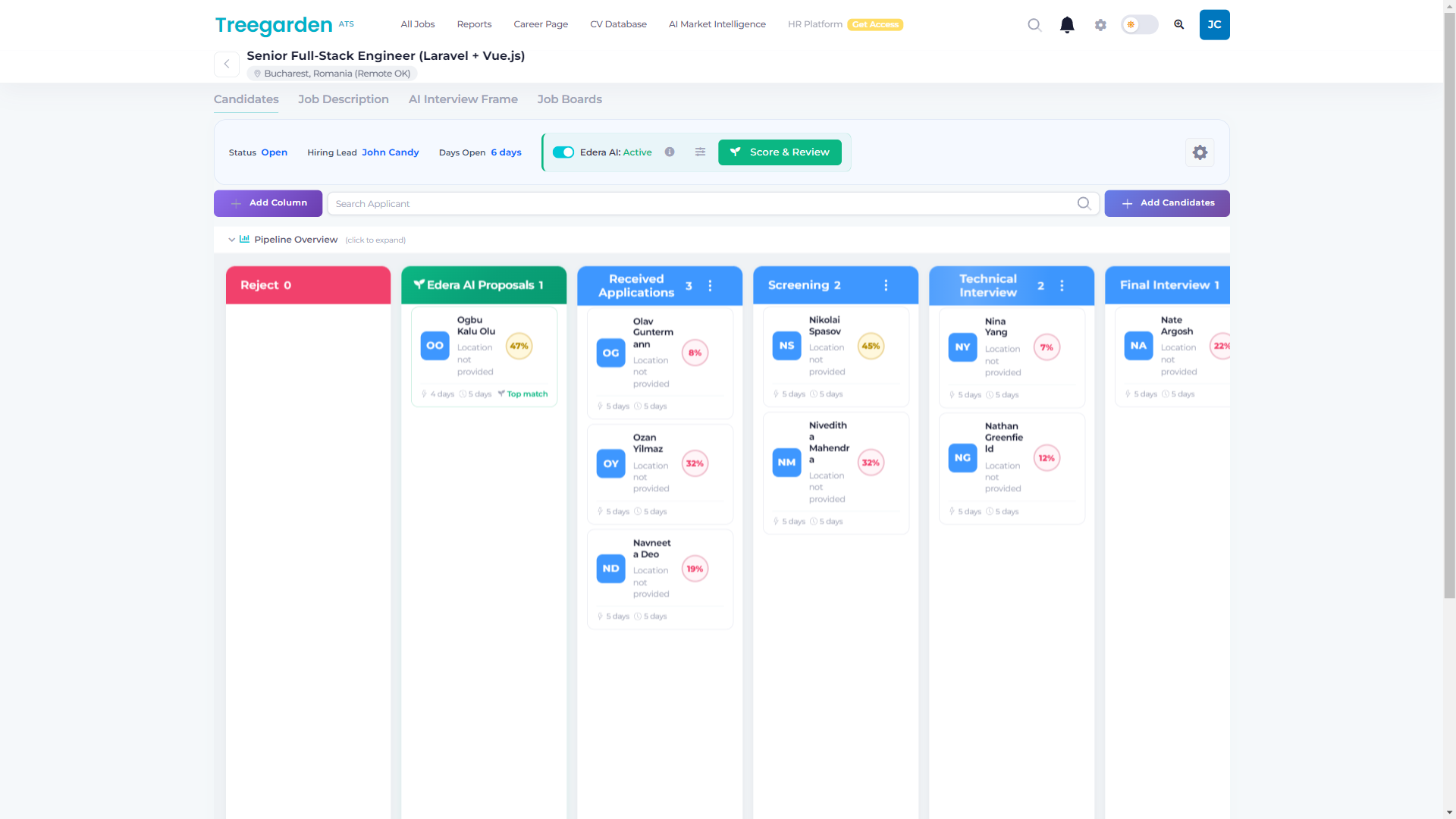
Go-live checklist
| Checklist item | Responsible | How to verify |
|---|---|---|
| All pipeline stages configured and ordered correctly | ATS admin | Run a dummy application through every stage from inbox to terminal state |
| Interview kits rebuilt for all active job types | Recruiting lead | Walk through a mock interview using each kit; submit a test scorecard and confirm the hiring manager can see it |
| Approval workflows configured for requisitions and offers | ATS admin and HR Director | Run a test approval request through each workflow; confirm routing and fallback logic |
| All active user accounts created with correct permissions | ATS admin | Log in as a hiring manager test account; confirm role access and stage visibility |
| Job board integrations reconnected and tested | ATS admin | Post a test role; verify it appears on each connected job board within the expected window |
| Candidate import validated | Recruiting lead | Spot-check 50 records across different job types and time periods against the Greenhouse source |
| HRIS integration reconnected (if applicable) | IT and HRIS admin | Mark a test candidate as hired in the new ATS; verify the HRIS sync fires correctly |
| Candidate-facing and internal email notifications tested | ATS admin | Trigger each notification type from a test record; confirm delivery and content |
| Hiring manager briefing completed | Recruiting lead | All hiring managers have seen the scorecard review workflow demonstrated before go-live |
| Greenhouse cancellation notice submitted | Finance and HR Director | Review your contract for the notice period requirement; submit via the correct channel per your contract terms |
Communicating the transition to hiring managers
Show hiring managers how to find feedback, compare interviewers' assessments and run a debrief in the destination. Explain any changed behavior before go-live. Measure readiness with a representative task rather than assuming everyone will adapt within a fixed period.
Plan an announcement, a practical scorecard demonstration and a short reference explaining changes and support contacts. Set dates around the team's availability and the validated cutover plan; no standard lead time fits every migration.
Build a migration timeline from the actual scope
| Workstream | Exit criterion before the next workstream | Owner to name |
|---|---|---|
| Audit and vendor selection | Retention, integration, attachment, interview-kit and commercial scopes are documented. | Recruiting lead and vendor owner |
| Export and mapping | The approved source records and documents can be exported, reconciled and mapped to the destination data model. | Technical owner and data owner |
| Configuration rebuild | Workflows, permissions, interview criteria, notifications and integrations are configured and reviewed. | ATS administrator and recruiting lead |
| Pilot and validation | A representative import and end-to-end hiring workflow pass the agreed acceptance checks. | Recruiting lead and test participants |
| Cutover and close-out | Active roles, historic access, data handling, training and contract actions have named owners and dates. | Project owner, legal and IT |
Estimate the duration only after these owners agree on the scope and acceptance criteria. A vendor's proposed date is not a substitute for a documented migration plan.
The pitfalls that catch experienced, well-prepared teams
The following are planning risks to test, not claims drawn from a published Treegarden customer migration study.
Document access mistaken for a completed archive. Record attachment counts, validate downloads and test record-to-file mappings while source access remains available. A list of URLs is not proof that the destination holds usable documents. Record missing files and resolve the exceptions before closing the source account.
Retention and deletion requests missed during handoff. Reconcile retained fields and outstanding deletion requests in the source, working archive and destination. Do not disable retention or widen the historical window merely to increase import counts. Resolve any proposed policy change with the responsible privacy owner.
Custom integrations omitted from the inventory. Ask IT about scripts, webhooks, automation tools and reporting jobs outside the integrations panel. Name an owner to replace, retire or reconnect each required dependency and test its failure behavior.
Interview kit rebuild treated as a background task. The kit rebuild is configuration work, not a data task. Give an experienced recruiter ownership of the competency framework, questions and rating guidance, and make it a named deliverable with an agreed acceptance check.
Inbound guidance mistaken for outbound support. Greenhouse's spreadsheet importer describes importing into Greenhouse and lists Core, Plus and Pro availability. It does not establish what a different destination can import. Confirm your destination's batch limits, supported fields, document handling and relationship mapping directly.
Reporting definitions left unreconciled. Compare the source and destination definitions for time-to-fill, source attribution, stage conversion and offer acceptance. Validate denominators, timestamps and missing history with sample records. Mark metrics as not comparable until that reconciliation is complete; do not impose an unsupported three-to-six-month recovery period.
Treegarden as a Greenhouse migration destination
This section describes Treegarden specifically. If you are evaluating multiple ATS platforms, apply the same evaluation questions to all candidates.
Treegarden can be evaluated as a destination alongside other ATS options. Ask us to demonstrate an example job, candidate workflow, interview scorecard, role and permission setup, data-import approach and pricing model against your migration requirements.
Treegarden's published ATS pricing uses active-job capacity, with unlimited user accounts; the HR module is optional and employee-based. Its published plans use annual commitments with monthly instalments available. Confirm the current scope, implementation responsibilities and commercial terms in a written proposal.
Use the Treegarden versus Greenhouse comparison and the Treegarden ATS overview as starting points, then hold Treegarden to the same live migration and workflow test you apply to every other destination.
Evaluating Treegarden after Greenhouse?
Use a guided demo to test the migration tasks, workflow and commercial scope that matter to your team.
Book a demo →Related guides and comparisons
Use these to continue your research before committing to a migration project.
Get a pricing estimate
Startup $299/mo equivalent · Growth $499/mo equivalent · Scale $899/mo equivalent. Annual commitments with monthly instalments available. ATS pricing uses active-job capacity, not user seats; confirm scope in your quote.
Frequently asked questions
What data can I export from Greenhouse?
Greenhouse documents programmatic access through Harvest v3. Its active-candidate migration and bulk-import guides describe moving data into Greenhouse, not a complete outbound migration. For an export, confirm your v3 permissions, retention settings, required endpoints and destination mappings. Validate attachments, history and configuration separately rather than assuming a candidate export contains everything.
How long does a Greenhouse migration take?
There is no universal Greenhouse migration timeline. Scope the project from the records and attachments being moved, retention rules, configuration rebuild, integrations, testing, training and cutover approach. Estimate only after the destination vendor and internal owners have agreed who is responsible for each task.
Will I lose my interview scorecards when migrating?
Do not assume historical scorecards or interview-kit configuration will become native, usable scorecards in a new ATS. Preserve the interview criteria, rating guidance, questions and historical feedback that matter to your team, then validate how the target system will store and use them before cutover.
What are the real risks in a Greenhouse migration that experienced teams underestimate?
The risks worth checking are incomplete export scope, attachments that were not validated, retention settings, undocumented integrations, workflow and permission rebuild, reporting-definition changes and cutover ownership. Assign an owner and acceptance check to each risk before starting the full import.
Is it possible to switch from Greenhouse to a less expensive ATS without degrading hiring quality?
It can be possible, but price alone does not determine the outcome. Have each destination demonstrate the interview criteria, scorecards, approvals, reporting and integrations that your team relies on, then compare the written first-year cost and migration scope before making a decision.
Sources
- Harvest v3 endpoint migration reference, changed resources and relationships
- Greenhouse API overview (Greenhouse Support), Harvest API access levels and capability overview
- Harvest v3 OAuth authentication and permissions
- Harvest v3 cursor pagination
- Harvest API rate limits and retry handling
- Configure a data retention rule (Greenhouse Support), per-office configurable retention timer and anonymization documentation
- Active candidate migration into Greenhouse, not an outbound export specification
- Bulk import candidates from spreadsheet (Greenhouse Support), current import guidance