
Applicant Tracking System (ATS Software): What It Is, Who Needs One & How to Choose
An applicant tracking system is the operational backbone of modern recruitment - the ATS software that converts a job opening into a structured pipeline of candidates, decisions, and a hire. This guide explains what an ATS actually does, who needs one (and who doesn't), the 12 features that matter, how to evaluate vendors honestly, and what to budget. Independent. No "10 best ATS" affiliate fluff.
1. What is an applicant tracking system?
Definition: An applicant tracking system (ATS) is software that manages the recruitment workflow end to end — receiving job applications, parsing CVs, storing candidate data, progressing candidates through hiring stages, scheduling interviews, capturing structured feedback, and producing reporting on hiring outcomes.
Put differently, the ATS is the system of record for everything that happens between a candidate clicking "apply" and an offer being signed (or rejected). It replaces the historical alternative — a shared inbox, a spreadsheet, a folder of CVs on someone's desktop, and a calendar that nobody else can see — with a structured database where every candidate, every conversation, and every decision is timestamped, attributable, and searchable.
The category emerged in the late 1990s with the first SaaS ATS platforms. Adoption was largely confined to large enterprises until the mid-2010s, when cloud-native, modern-UX platforms like Greenhouse, Lever, and Workable made ATS software accessible to companies as small as five employees. By 2026, an ATS is standard infrastructure for anything beyond the most occasional hiring.
2. How an ATS works: the seven stages
Every modern ATS automates the same fundamental seven-stage workflow. The vendors differ in how thoroughly they cover each stage, how easily the workflow can be customised, and how well the experience holds together when a real recruiter is moving through it 50 times a day. The stages themselves are universal:
- Job intake. Hiring manager submits a structured request — role, level, salary band, must-haves, nice-to-haves, hiring panel — that the recruiter then publishes as a job opening with a unique requisition ID.
- Sourcing & distribution. The job is published to the company's careers page and pushed to the chosen job boards (LinkedIn, Indeed, Glassdoor, country-specific boards) plus any agency portals. Inbound applications flow into the same pipeline as proactively-sourced candidates from the recruiter's outreach.
- Application capture & parsing. Applications arrive with a CV. The ATS parses the CV — extracting name, contact, work history, education, skills — and creates a structured candidate record. Modern parsers handle PDF, DOCX, and image-based CVs in dozens of languages with reasonable accuracy.
- Screening. Candidates are reviewed against the role criteria, often with AI-assisted ranking flagging the strongest matches. Screening questions on the application can auto-progress or auto-pause candidates based on knockout criteria. Recruiters review remaining candidates manually and decide who advances.
- Interviewing. Selected candidates move into structured interview pipelines: phone screen, technical/skills, hiring manager, panel, final. Interviews are scheduled (the ATS integrates with the interviewer's calendar), conducted, and scored on structured scorecards rather than free-text "good vibes" emails.
- Offer & close. The successful candidate receives an offer through the ATS, which generates the offer letter, captures e-signatures, and progresses the candidate to "hired". Unsuccessful candidates receive a rejection — ideally with feedback and timing that respects them.
- Reporting & close-out. The ATS produces metrics on time-to-hire, time-in-stage, source effectiveness, pass-through rates, recruiter load, and diversity outcomes. The hire is handed off to the HRIS for onboarding.
See the recruiting workflow in Treegarden
Treegarden is an ATS and HR platform. The product interface below shows a hiring workspace with open roles, named hiring owners, job status and applicant counts in one operating view. It is a product example, not a customer case study or a promise of a specific hiring outcome.
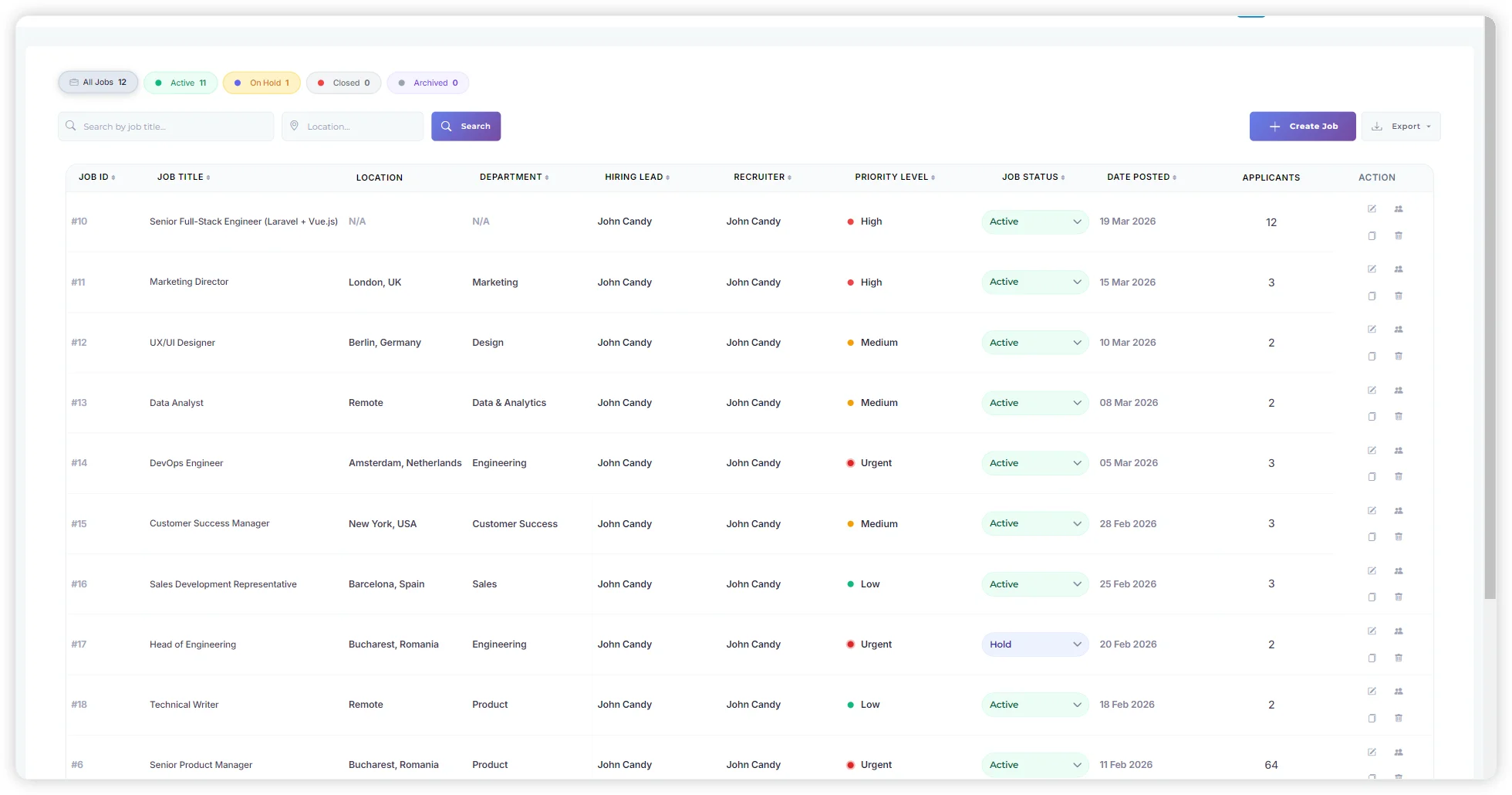
When comparing an ATS, ask each vendor to demonstrate the same sequence: create a role, route candidates through the pipeline, collect structured feedback, review the reporting view and test the exception path. Use the ATS implementation guide to plan the rollout, then review the relevant product areas: workflow automation, collaborative hiring, recruitment analytics, and security and compliance.
3. Who needs an ATS — and who genuinely doesn't
The conventional answer is "everyone hiring more than five people a year". The honest answer is more nuanced. Some sub-five-hires-a-year companies need an ATS because their hiring is high-touch and high-volume relative to applications received. Some 50-hire-a-year companies survive without one because their hiring is concentrated into one or two short windows handled by a dedicated agency. The threshold isn't headcount — it's concurrent active candidates across concurrent open roles.
You probably need an ATS if:
- You have more than three open roles at the same time, more than once a quarter.
- Each role attracts more than 30 applicants (most do, post-2024).
- More than one person is involved in hiring decisions.
- You need to demonstrate fair process — for compliance, board reporting, or because you've been challenged on a rejection in the past.
- You hire across multiple countries (jurisdictional data rules require structured handling).
- Your CEO has asked "how many candidates are in the pipeline for the senior engineer role?" and you needed an hour to answer.
You probably don't need an ATS yet if:
- You hire fewer than five people a year, all in one country.
- One person handles every step of every hire.
- Most of your hires come from network referrals, not job board applications.
- You're using an agency that handles candidate management end to end — you only see shortlisted finalists.
The transition point is usually obvious in retrospect: it's when a senior person spends a full afternoon trying to reconstruct what happened with a particular candidate, and the answer is in three different inboxes and a Slack channel that's been archived.
4. The 12 ATS features that actually matter
Vendor feature lists run to 200 line items. The reality is that 12 features account for almost all of the day-to-day value you'll get from your ATS — and the gap between vendors on these 12 is what should drive your selection.
1. Configurable hiring pipelines
Not every role uses the same stages. The ATS must let you build per-role pipelines with custom stages, owners, and SLAs without involving a vendor implementation team.
2. Accurate CV parsing
Parsing accuracy in your candidate languages, on your typical CV formats, makes the difference between an ATS that saves time and one that creates rework.
3. Communication templates & merge fields
Personalised-feeling rejection and progress emails at scale, with merge fields that pull from the candidate record. Bulk send without losing personalisation.
4. Calendar integration
Direct two-way sync with Google Calendar / Microsoft 365 / Outlook. Self-service candidate scheduling. Panel availability collation. No copy-paste of times.
5. Structured interview scorecards
Per-stage, per-competency scorecards that interviewers fill in before the next interview. Forces the interview conversation away from "did I like them" toward evidence.
6. Collaborative hiring
Hiring manager and panel access controls, comment threads on candidates, decision logs that capture who said what when. Removes the hiring manager from your inbox.
7. Job board distribution
One-click publishing to the boards your candidates actually use — including country-specific ones. No per-board log-ins. Sponsored job spend tracked centrally.
8. Branded careers page
A careers site that matches your brand, loads fast, and converts. Most candidates research the company on the careers page before applying — it's a sales surface.
9. GDPR / CCPA compliance
Configurable retention windows, subject access request export, automated right-to-erasure, candidate consent capture. Audit-ready.
10. Hiring reporting
Time-to-hire, time-in-stage, source effectiveness, pass-through rates, drop-off analysis, diversity reporting. Real numbers, not vanity charts.
11. Integrations
Native integration with your HRIS, identity provider (SSO/SAML), background-check vendor, and assessment tools. Open API for the integrations you'll need to build.
12. AI candidate ranking
Models that rank candidates against the actual role criteria — and explain why. Not "AI" as a marketing word.
5. Types of ATS: SMB, mid-market, enterprise
The ATS market segments cleanly by company size, with predictable trade-offs at each tier.
Small business ATS (1–50 employees, <30 hires/year)
Examples: Treegarden Starter, Workable Starter, Recruitee, Manatal. Strengths: fast set-up (under an hour), low cost ($50–$200/month), opinionated workflow that just works out of the box. Trade-offs: limited customisation, fewer integrations, simpler reporting. The right choice if you want to be hiring tomorrow, not configuring next quarter. For a practical buying decision, see the small-business ATS guide.
Mid-market ATS (50–500 employees, 30–500 hires/year)
Examples: Treegarden Growth, Workable Premier, Greenhouse Essential, Lever Standard, JazzHR. Strengths: configurable pipelines, depth of reporting, integration ecosystem, structured interview tooling. Trade-offs: longer implementation (2–6 weeks), higher cost ($400–$2,000/month), more onboarding required for the team.
Enterprise ATS (500+ employees, 500+ hires/year)
Examples: Workday Recruiting, SAP SuccessFactors, Oracle Taleo, iCIMS, SmartRecruiters Enterprise, Greenhouse Enterprise. Strengths: deep customisation, multi-entity / multi-country support, advanced governance, formal vendor SLAs. Trade-offs: 3–9 month implementation, $3,000–$20,000+/month, frequent need for an in-house ATS administrator. Worth it for the genuinely complex environments — wrong choice for the rest.
6. ATS vs CRM vs HRIS: what's the difference?
The terminology overlaps and vendors blur it. The functional distinction is clear:
- ATS (Applicant Tracking System) — manages active candidates progressing through specific job applications. Workflow ends at offer-accepted.
- Recruitment CRM — manages relationships with passive candidates and talent pools who haven't yet applied to a specific role. Used for pipeline-building and employer-brand nurture.
- HRIS (Human Resource Information System) — manages the employee lifecycle after hire: onboarding, payroll, benefits, performance, time off, off-boarding.
Most companies need ATS first. Recruitment CRM becomes valuable once your talent pool grows beyond what individual recruiters hold in their heads. HRIS becomes essential at the same time you need an ATS — the two systems handle adjacent halves of the same employment lifecycle and must integrate cleanly. Modern platforms (Treegarden, BambooHR, HiBob, Workday) increasingly include both ATS and HRIS in one product to remove the integration tax altogether.
If passive sourcing is becoming a serious channel, use the commercial recruitment CRM software guide to decide whether your ATS candidate database is enough or whether you need dedicated candidate relationship management workflows.
For a team hiring 30 to 100 people a year and choosing both systems together, see the ATS + HRIS systems comparison for mid-market teams.
Recruiting software and talent acquisition software: what buyers mean
"Recruiting software" and "talent acquisition software" are umbrella terms. Buyers usually need to separate the core system of record from the specialist workflows around it. For most teams, the applicant tracking system is the core: it manages active jobs, candidates, interviews, scorecards, offers, and reporting.
- Recruiting software can describe the full hiring stack, including job distribution, applicant tracking, interview scheduling, sourcing, and recruitment analytics.
- Talent acquisition software often adds longer-term sourcing, talent pools, employer-brand activity, and workforce-planning workflows to the active hiring process.
- Choose the ATS first when the operational problem is fragmented active hiring. Add specialist tools only when they remove a proven bottleneck without creating duplicate candidate records.
Use the supporting product pages to evaluate specific parts of that workflow: recruitment automation software, interview scheduling and management software, and recruitment CRM software.
7. How to evaluate vendors honestly
Vendor evaluation is structurally biased. The vendor sales team controls the demo, the comparison sheet, and the references. Most public review sites (G2, Capterra, GetApp) are pay-to-play to a degree that affects rank ordering. Review aggregators reward vendors who pay, not vendors who are best for you. Here's how to cut through:
- Define your own scorecard before you take a single demo. Score the 12 features above against your specific use case, weighted by what matters most. Not the vendor's feature list — yours.
- Demo with your real data, not theirs. Ask the vendor to set up a sandbox with three real (anonymised) job openings and 20 real CVs. Run a typical week through it. The vendor's demo job is staged; yours is not.
- Talk to references the vendor didn't pick. Ask the vendor for three references — then find three more on LinkedIn from companies your size in your sector. The vendor-picked references are happy customers; the others are the population.
- Read the renewal terms in the contract. Annual price uplift cap, notice period, data export terms, what happens to your data on termination. The renewal year is when most ATS contracts go bad.
- Pilot for 90 days if you can. A 90-day pilot with two real roles tells you everything a 12-month contract will. Most vendors will agree to it if you ask.
How to prove the workflow in a demo
Do not buy an ATS from a feature tour. Ask each vendor to run the same small proof with your anonymised data: one live requisition, a short candidate list, an interview scorecard, an approval, and a post-hire handoff. The result is more useful than a generic comparison grid because it exposes the work your team will actually repeat.
- Create a requisition. Check hiring-manager approvals, required fields, permissions, and whether the workflow matches your internal process without custom development.
- Process candidates. Upload or import a small anonymised sample, search it, route candidates through stages, and test duplicate handling, communication history, and data retention controls.
- Run a structured interview. Ask an interviewer to complete a scorecard before the debrief. The U.S. Office of Personnel Management describes structured interviews as a consistent process that uses the same job-related questions and rating scales for candidates.
- Test the exception path. Change a stage, withdraw a candidate, reopen a role, and check the audit trail. This reveals whether the platform supports real operational decisions rather than an idealized demo path.
- Model the first year and renewal. Put the active jobs, users, integrations, implementation, data migration, support, and renewal terms into one written commercial model before comparing price labels.
Method and disclosure: Treegarden sells ATS and HR software. This guide therefore treats product claims as items to verify in a live workflow, not as a substitute for a security, privacy, legal, or procurement review. For structured interview design, see the U.S. Office of Personnel Management's structured interview guidance. For ATS category and pricing context, see the ATS pricing comparison, the ATS vs HRIS guide, the recruitment CRM software guide, and the documented Treegarden vs Greenhouse comparison.
8. What an ATS costs in 2026
The honest pricing landscape, with the gotchas vendors don't print on the pricing page:
| Segment | Monthly cost | What you get | Watch out for |
|---|---|---|---|
| Free / Open-source | $0 | OpenCATS, OrangeHRM Recruit. Self-hosted, basic functionality. | Hosting, security patching, no support — engineering tax is the real cost. |
| Small business | $50–$200 | Up to 10 users, unlimited or moderate job count. Core features. | Per-job-slot pricing models that escalate fast above 5 active jobs. |
| Growth / mid-market | $400–$2,000 | 20–50 users, AI screening, integrations, structured interviews. | "AI" as a paid add-on. Renewal increases of 7–15% baked in. |
| Enterprise | $3,000–$20,000+ | Unlimited users, deep configurability, SLAs, named CS contact. | Implementation fees ($10K–$200K) often not in the published price. |
Pricing models also vary in ways that matter:
- Per user. Predictable as you grow the recruiting team.
- Per active job slot. Cheap if you hire intermittently, painful if you have many concurrent openings.
- Per employee headcount. Common in HRIS+ATS bundles. Predictable but penalises growth.
- Flat-rate / unlimited. Increasingly the modern norm. Best for predictability but typically a higher entry price.
Whatever the model, ask for the year-three price, not the year-one price. The year-three number is what you're really committing to.
9. Where AI in ATS is worth it (and where it isn't)
By 2026, "AI" is on every ATS vendor's homepage. The features that genuinely save time and improve hiring quality are narrower than the marketing implies.
AI features that are worth it
- Candidate ranking against role criteria. A well-tuned model that explains why candidate A scores higher than candidate B saves hours of CV reading.
- Screening question scoring. Free-text screening question answers scored against a rubric. Reduces the "everyone gets a phone screen" tax.
- Interview question generation. Role- and CV-specific suggested questions for interviewers who haven't prepared. Better-than-baseline interviews from less-than-prepared interviewers.
- Scorecard summarisation. Synthesising panel scorecards into a hire/no-hire recommendation with the underlying reasoning visible.
AI features that are risky
- Auto-rejection. Models that reject candidates without a human in the loop. Surfaces bias, creates legal exposure under the EU AI Act and various US state laws (NYC AEDT, Illinois AIVI, California's draft regulations).
- Predictive "will this candidate succeed in the role" scoring. The training data isn't there to make this accurate — and the bias risk is enormous.
- AI-generated rejection reasons that read as personalised. Candidates notice. Pattern-matched rejections damage employer brand more than no rejection at all.
Buy from vendors that publish their model approach, training data sourcing, and bias testing methodology. Vendors that say "AI" without those details are betting you won't ask.
10. Frequently asked questions
What is an applicant tracking system?
Do small companies need an ATS?
How much does an ATS cost?
What's the difference between an ATS and a CRM?
What's the difference between an ATS and an HRIS?
Is AI in ATS worth it in 2026?
How long does ATS implementation take?
Can I migrate from one ATS to another?
Small ATS and HRIS comparison cluster
For buyers comparing smaller ATS and small-company HR software
These pages target buyers searching for smaller ATS vendors, UK ATS comparisons, and HR software for small companies before they are ready for an enterprise suite.