
Employee offboarding best practices start with one accountable coordinator and a documented handoff. Confirm the departure date, assign HR, IT, payroll and manager actions, agree the access cutoff, transfer business records, and verify completion. A task marked complete is not the same as a confirmed account shutdown, paid wage or returned laptop.
US scope. Last verified October 20, 2026. This is an operational resource for US employers, not a termination procedure, legal form or compliance certification. Applicable state and local law, employer coverage, plan terms, contracts and the facts of a departure need review by the responsible specialist.
About this resource: Treegarden publishes this guide and sells ATS and HR software. The checklist is a standalone Treegarden resource, not evidence of a product integration or legal review. No customer outcome is claimed.
Employee offboarding checklist downloads
Use the Word checklist for a documented case review or the Excel workbook for task tracking. Keep sensitive employee details in approved restricted systems, not in a broadly shared checklist.
- Download employee offboarding checklist (Word .docx)
- Download employee offboarding checklist (Excel .xlsx)
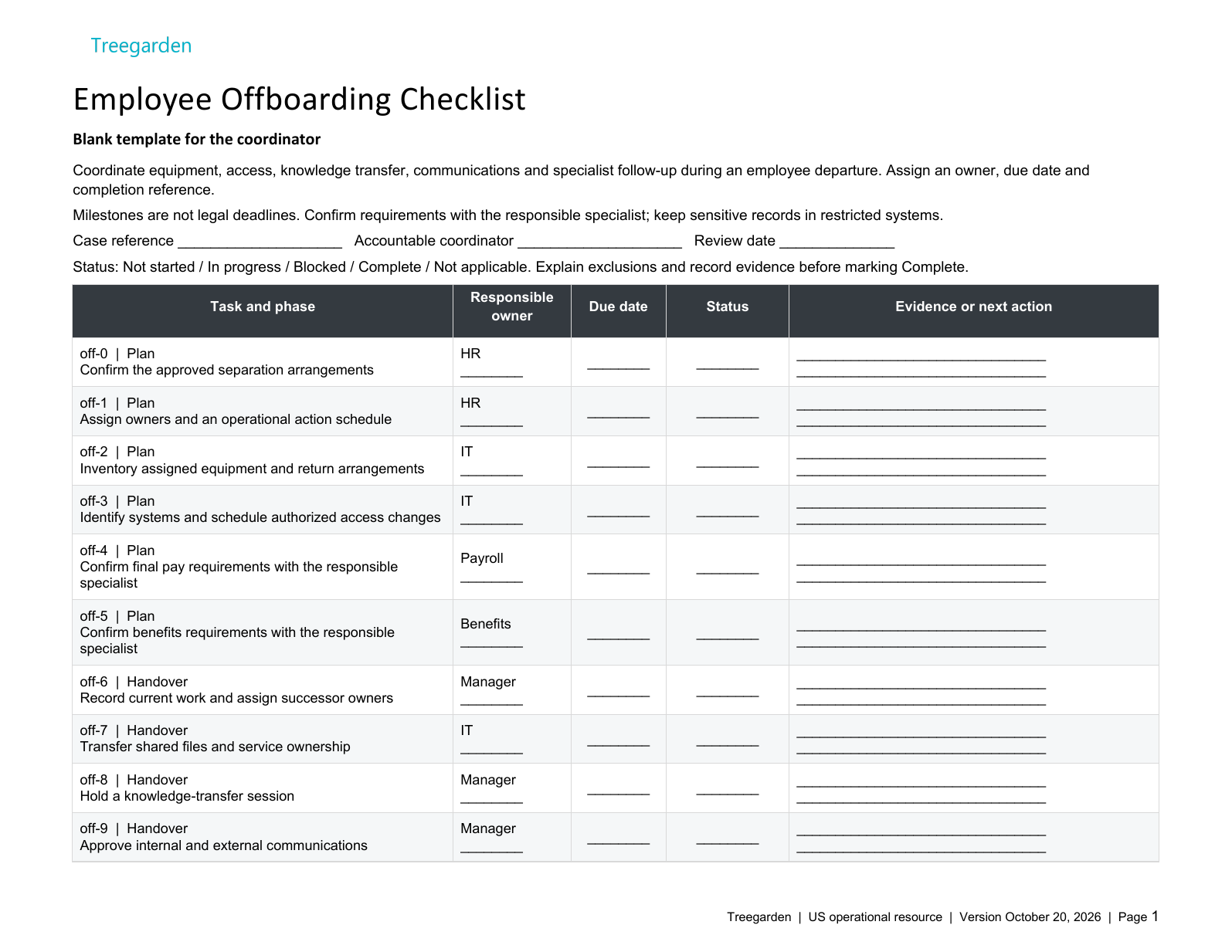
20 tasks across four phases
The checklist starts with six planning tasks. Suggested responsible roles are starting points: assign a specific person and an operational due date for each applicable task.
| Phase | Task | Responsible role | Check |
|---|---|---|---|
| Plan | Confirm the approved separation arrangements | HR | Confirm the authorized last working date and accountable coordinator through the approved HR process. Do not store reasons or personal details here. |
| Plan | Assign owners and an operational action schedule | HR | Coordinate HR, manager, IT, payroll and benefits responsibilities. Confirm any applicable legal timing with the responsible specialist. |
| Plan | Inventory assigned equipment and return arrangements | IT | Use neutral asset references only. Agree secure return logistics; do not record home addresses in this shared checklist. |
| Plan | Identify systems and schedule authorized access changes | IT | Cover SSO, applications, VPN, sessions and credentials under IT control. Confirm timing with HR and the manager; do not store passwords. |
| Plan | Confirm final pay requirements with the responsible specialist | Payroll | Confirm applicable requirements with the responsible payroll or legal specialist. Do not assume a universal deadline, calculate entitlement here or tie payment to equipment return. |
| Plan | Confirm benefits requirements with the responsible specialist | Benefits | Confirm applicable requirements with the responsible benefits specialist, including any notices or continuation process. Do not assume every employer or plan has the same obligations. |
Handover, access and closeout: 14 more tasks
| Phase | Task | Responsible role | Check |
|---|---|---|---|
| Handover | Record current work and assign successor owners | Manager | Prioritize open commitments, next actions and authorized access. Keep customer and employee information in approved systems. |
| Handover | Transfer shared files and service ownership | IT | Move ownership through approved controls before access is removed. Preserve required records and avoid copying restricted content into this tracker. |
| Handover | Hold a knowledge-transfer session | Manager | Verify that the successor can find approved documentation and identify unresolved dependencies. |
| Handover | Approve internal and external communications | Manager | Agree who informs each audience and what can be shared. Limit personal details and use authorized messaging. |
| Handover | Confirm expense and time-record follow-up | Payroll | Use the approved payroll and expense process. Any payment or deduction decision belongs with the responsible specialist, not this checklist. |
| Handover | Offer an appropriate feedback route | HR | Use a voluntary approved channel where appropriate. Keep any response confidential and outside this operational tracker. |
| Access and returns | Collect equipment and document unresolved returns | IT | Record neutral evidence of return or a follow-up action. Equipment status is separate from pay or benefit decisions. |
| Access and returns | Execute the approved access-removal schedule | IT | Disable only authorized accounts and sessions at the agreed time. Rotate shared secrets through secure controls where appropriate. |
| Access and returns | Verify physical and third-party access changes | IT | Review badges, keys, vendor portals and shared collaboration access with their owners. Do not record access codes. |
| Access and returns | Verify handover and communication completion | Manager | Confirm an accountable person owns remaining commitments; mark unresolved items as open rather than assuming completion. |
| Closeout | Confirm specialist actions are tracked to resolution | HR | Check that pay and benefits actions have an owner and evidence. Do not certify legal compliance or calculate entitlements. |
| Closeout | Review record access and preservation requirements | HR | Confirm applicable retention and any legal hold with the responsible specialist before archiving or deleting anything. No universal retention period is supplied. |
| Closeout | Review exceptions and assign follow-up actions | HR | Keep outstanding equipment, access or handover issues visible with owners and due dates. Do not mark blocked tasks complete. |
| Closeout | Record operational closure when applicable tasks are evidenced | HR | Closure means the documented operational checklist is resolved, not a legal or compliance verdict. Carry unresolved items forward. |
The workbook contains Instructions, Blank Template and Fictional Example sheets, status dropdowns and five extra task rows. A task marked Complete counts toward verified progress only when a responsible person, due date and neutral completion reference are recorded. Not applicable needs an assigned person and a reason; it is not a substitute for an unresolved task. Filters do not change whole-table totals.
Use neutral ticket or confirmation references. Keep passwords, personal details, pay amounts and the content of confidential records in the approved systems, not in the checklist.
Assign offboarding responsibilities
Open the case when a departure is confirmed. Record the employment end date separately from the last working time, the access cutoff and any later administrative follow-up. The employee's work location may matter more than headquarters when payroll or counsel reviews applicable requirements.
| Owner | Decision or action | Completion evidence |
|---|---|---|
| HR coordinator | Confirm dates, stakeholders, communication plan and unresolved exceptions. | Approved case plan and named next owner for every open item. |
| Manager | Identify ongoing work, transfer ownership and agree who covers customer commitments. | Successor accepts the handover and can open the required files. |
| IT and security | Approve the access cutoff, inventory accounts and verify technical actions. | Restricted ticket references, timestamps and exception decisions. |
| Payroll and benefits | Confirm final-pay treatment and any applicable benefit notices. | Payment or notice confirmation stored in the appropriate restricted system. |
| Facilities or asset owner | Arrange return of devices, keys, badges and other property. | Receipt or shipping reference; unresolved assets remain open. |
| Legal or designated reviewer | Review matters requiring advice and decide record-preservation instructions. | Approval or hold reference, without copying privileged advice into the tracker. |
Assign a backup owner for time-critical actions. If a task is blocked, record the dependency and escalation contact instead of marking it complete to close the case.
Finalize employment documents, pay and benefits
Prepare an itemized review list rather than a universal exit pack. Not every departure needs a separation agreement, release, restrictive covenant or reference letter. Use approved documents appropriate to the situation.
| Item | Responsible review | What the checklist records |
|---|---|---|
| Departure confirmation | HR confirms the approved dates and basis for the process. | Reference and approval status, not sensitive allegations. |
| Final wages, expenses and leave balance | Payroll checks applicable law, policy and agreements. | Verified payment plan and a restricted evidence reference. |
| Benefits continuation | The benefits owner checks plan coverage, qualifying events and notice responsibilities. | Assigned administrator, applicable due date and delivery confirmation. |
| Agreement or release, if proposed | Counsel checks suitability, language and any applicable review requirements. | Review status; no preselected waiver or signing deadline. |
| Record preservation | HR and the records owner check retention categories and holds. | Repository, reviewer and next review action. |
The US Department of Labor's final-pay guidance explains that federal law does not generally require an immediate final paycheck, while state rules may. Confirm the applicable timing and deductions; do not use equipment return as an automatic condition for wage payment.
For covered plans and qualifying events, use the DOL COBRA guidance for employers with the plan administrator. This checklist does not determine eligibility, replace required notices or set a single benefits deadline.
Secure data and revoke access at an approved cutoff
Plan access changes with HR, IT and the manager. A planned resignation and an immediate separation may need different sequences. Preserve business information and any required evidence before deleting or wiping anything; disabling sign-in is a different action from deleting an account.
| Access area | Check | Verification |
|---|---|---|
| Identity provider, email and remote access | Disable approved accounts and address active sessions and recovery methods. | Confirm actions in the relevant administration tools. |
| Separate SaaS and privileged accounts | Check non-SSO accounts, administrator roles, service ownership and individual keys. | System owners confirm access removal; record exceptions. |
| Shared secrets and business files | Transfer approved ownership and rotate shared credentials where needed. | Successor can access work through their own account. |
| Devices and physical access | Recover equipment and remove badge or key access as approved. | Asset receipt and access-system confirmation. |
NIST SP 800-53 Rev. 5, control PS-4 provides a security-control reference for disabling access, revoking credentials, retrieving property and retaining access to organizational information. Its timing is organization-defined, not a universal employment-law deadline. Citing NIST does not mean this template or Treegarden is NIST-certified.
Transfer knowledge with a receiving owner
A useful handover identifies the work, its current state, the next decision and the person accepting it. A folder full of unexplained files is not a completed handover. Do not ask a departing employee to share their personal password or keep working after employment ends without an appropriate arrangement.
- List active projects, customer commitments and upcoming decisions.
- Link to approved working files and explain their current version.
- Record the next action, dependency and receiving owner for each item.
- Walk the receiving owner through recurring work when feasible.
- Verify access using the receiving owner's own account.
Fictional example: access closed, departure case still open
Fictional planning example. Last working date October 19, 2026; review date October 20, 2026. Dates are invented operational targets, not legal deadlines. The case remains open.
| Task | Responsible role | Due date | Status | Evidence or next action |
|---|---|---|---|---|
| Confirm final pay requirements with the responsible specialist | Payroll | 10/16/2026 | Complete | Fictional OFF-005 completion confirmation. |
| Collect equipment and document unresolved returns | IT | 10/19/2026 | Blocked | Fictional accessory return outstanding; IT owns return follow-up. Pay actions remain separate. |
| Execute the approved access-removal schedule | IT | 10/19/2026 | Complete | Fictional OFF-014 completion confirmation. |
| Confirm specialist actions are tracked to resolution | HR | 10/22/2026 | In progress | Fictional open action assigned to HR; next review October 22, 2026. |
| Review record access and preservation requirements | HR | 10/22/2026 | Not started | Fictional follow-up planned; no completion evidence yet. |
| Record operational closure when applicable tasks are evidenced | HR | 10/22/2026 | Blocked | Fictional case remains open until the equipment and specialist follow-up actions have evidence. |
The completed access task does not close the whole case. The outstanding accessory stays separate from pay, and specialist follow-up and record review remain unresolved. These invented dates describe the example, not a required departure timetable.
Conduct an optional, purposeful exit conversation
Offer a consistent set of questions about the role, management, work environment and handover. Explain who will see the notes and how they may be used. Do not promise absolute anonymity or confidentiality, particularly in a small team or where a concern requires investigation.
Keep the interview separate from pay, benefits and equipment administration. Give the employee a way to raise concerns with an appropriate contact, and route allegations through the relevant internal process rather than treating them solely as survey data.
Communicate respectfully without exposing private details
Agree a factual message for colleagues and customers: the transition date, the new contact and any change to service arrangements. Share only what is needed. A respectful exit is worthwhile in its own right; it does not guarantee favorable reviews, referrals or future rehires.
Close exceptions after departure
Review unreturned assets, unresolved payroll questions, missing handover information and record-preservation actions with their owners. Provide a suitable contact for legitimate post-employment queries. An alumni invitation or reference request is separate from required administration; do not treat consent to future communications as a condition of completing the exit.
Escalate departures that need specialist review
This resource does not decide whether a dismissal is lawful. Obtain appropriate review for involuntary separations, layoffs, disputed pay, protected leave or accommodation issues, allegations, union or contract provisions, proposed releases, or immigration-related questions. Group departures may require a separate process. Do not import UK redundancy deadlines or assume that at-will employment removes other obligations.
Offboarding also does not authorize immediate record disposal. The EEOC's recordkeeping guidance requires covered employers to preserve relevant records when a charge is pending until final disposition. Ask the records or legal owner to identify applicable holds and retention rules before deletion.
Measure the process without overstating the result
Review tasks still open after their approved due dates, unverified access actions, missing asset receipts and handovers the receiving owner has not accepted. A completion percentage is a process measure, not proof of legal compliance or system security.
If you summarize exit feedback, state the number of responses and reporting period, restrict access, and avoid publishing small groups that identify individuals. Themes can prompt further investigation; they do not establish why every employee left.
Evaluate the workflow in your HR system
Compare the responsibilities in this guide with your actual HR and IT process. For Treegarden product context, see employee onboarding and HR document management. In a demo, ask which actions are tracked as tasks, which require a person to act in another system, and which integrations are available for your setup. These downloads do not provision accounts, remove access or establish a compliant retention schedule.
Sources
Sources checked October 20, 2026: DOL: last paycheck; DOL: COBRA employer guidance; EEOC: recordkeeping; NIST SP 800-53 Rev. 5 (PS-4). Confirm current requirements for the applicable jurisdiction and facts before use.
Frequently asked questions
What is employee offboarding?
Employee offboarding is the coordinated process for ending an employment relationship: confirming the departure, assigning owners, transferring work, removing access, returning assets, handling pay and benefits, and preserving the appropriate records.
When should system access be removed?
HR and IT should approve an exact cutoff time and time zone for the departure. Coordinate account, session, physical-access and credential changes with the separation plan; do not assume a universal 24-hour deadline or disable every account when notice is first given.
Can final pay wait until a laptop is returned?
Do not make final pay automatically conditional on equipment return. Payroll or counsel should confirm the applicable wage-payment and deduction rules. Track missing equipment as a separate action.
Should all employee records be deleted after departure?
No. Departure does not create one deletion date for every record. Apply the approved schedule for each record category and preserve material subject to a charge, investigation or legal hold before authorizing disposal.
Does the offboarding checklist automate account removal?
No. The Word and Excel files are editable operational templates. They help record responsibility, dates, status and completion evidence; they do not connect to company systems or perform access revocation.