
HR document management means knowing what records you hold, where the authoritative copy lives, who may access it and what happens next. For US employers, start with a category-based inventory, named owners and restricted access. Then test retrieval, version history, retention review and disposal decisions. Moving files to the cloud does not by itself make them secure or compliant.
US scope. Last verified October 20, 2026. This practical resource is not a complete retention schedule or legal assessment. Requirements depend on employer coverage, record type, work location and other applicable rules. Confirm the schedule and handling of sensitive records with the appropriate HR, payroll, security and legal specialists.
Publisher disclosure: Treegarden publishes this guide and sells ATS and HR software. The original downloads are standalone operational aids, not official government forms, a certification or proof of a Treegarden feature. No human legal review is represented.
Employee file audit and document inventory downloads
Use the Word checklist to record an audit review and the Excel inventory to track document categories, ownership and open issues. Do not turn the inventory into a second employee file: store only neutral references to approved repositories.
- Download employee file audit checklist (Word .docx)
- Download employee document inventory (Excel .xlsx)
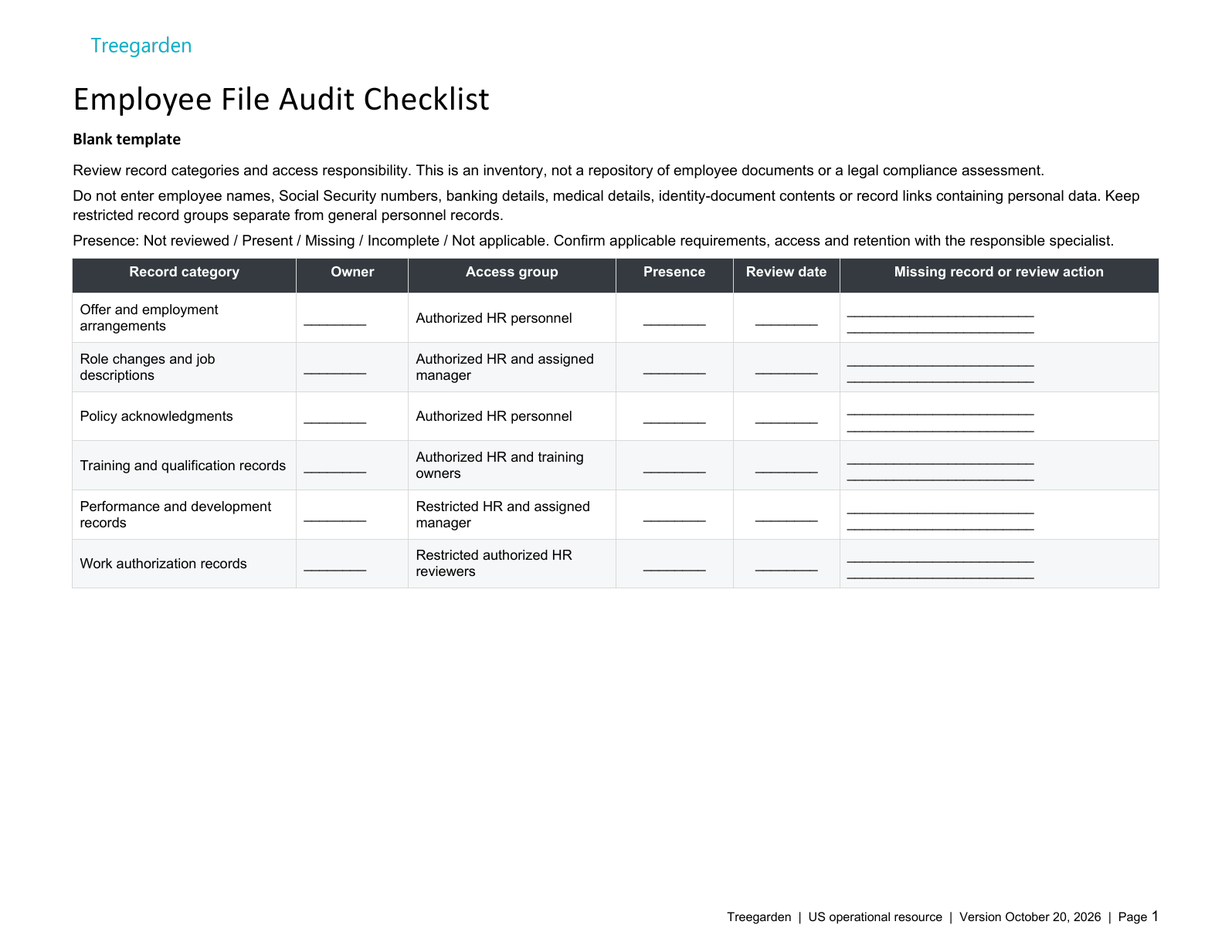
12 record categories to review
These categories match the downloadable checklist and inventory. The suggested access groups need your organization's approval; the list does not make every category mandatory for every employee.
- Offer and employment arrangements. Review approved offer or employment records without reproducing their contents. Suggested access: Authorized HR personnel.
- Role changes and job descriptions. Confirm the approved role record is available to appropriate owners. Suggested access: Authorized HR and assigned manager.
- Policy acknowledgments. Review status references; keep signed acknowledgments in the approved system. Suggested access: Authorized HR personnel.
- Training and qualification records. Confirm required categories with the responsible owner; no universal training requirement is implied. Suggested access: Authorized HR and training owners.
- Performance and development records. Limit access to authorized people; do not place appraisal text in this inventory. Suggested access: Restricted HR and assigned manager.
- Work authorization records. Keep this record group separately access-controlled. Record presence only, not identity documents or identifiers. Suggested access: Restricted authorized HR reviewers.
Payroll, benefits, confidential records and departure: six more categories
- Payroll and tax records. Keep bank details, tax identifiers and amounts in the payroll system, not this inventory. Suggested access: Restricted payroll specialists.
- Benefits administration records. Track category presence only; do not enter dependent information or elections here. Suggested access: Restricted benefits specialists.
- Medical and accommodation records. Keep separate from general personnel records with specifically authorized access. No medical details belong here. Suggested access: Separate restricted medical record group.
- Screening and background records. Record only category presence and a follow-up owner, not report findings or personal identifiers. Suggested access: Restricted authorized screening reviewers.
- Employee relations and investigation records. Keep case details outside this inventory. Confirm need-to-know access with the responsible specialist. Suggested access: Separate restricted HR and legal group.
- Offboarding and access closure records. Separate sensitive HR records from IT tickets; provide each owner only the records needed for their task. Suggested access: Authorized HR and relevant IT owners.
The Excel inventory has six fields: Record category, Owner, Access group, Presence, Review date, and Missing record or review action. It includes Instructions, Blank Template and Fictional Example sheets plus five extra category rows. Do not add employee identifiers or sensitive record contents.
A documented review needs the category, responsible person, access group, reviewed presence status and review date. Missing, Incomplete and Not applicable also need an action or reason. Review coverage measures categories reviewed, not whether all required records are present. Filters do not alter the whole-table totals.
Map the document landscape before moving files
Separate the recruiting record from the employee record and identify which information should transfer when someone joins. Avoid copying the entire candidate file into a general employee folder merely because a system offers an export.
| Category | Examples | Owner and handling question |
|---|---|---|
| Recruiting | Application, interview evaluation, hiring decision and accepted offer. | Recruiting and HR: which records remain in the ATS, and who can retrieve them? |
| General employment | Role information, approved employment changes, policy acknowledgments and performance records. | HR: which version is current, and which roles need access? |
| Payroll and tax | Withholding forms, pay records and payment instructions. | Payroll: is the system appropriately restricted and the record complete? |
| Employment eligibility | Form I-9 and supporting records maintained under the applicable process. | Authorized administrator: are current official instructions used and access restricted? |
| Medical and accommodation | Medical information and related confidential supporting material. | Designated officials: is information kept separately from general personnel files? |
| Investigation and separation | Case records, approved departure documents and preservation instructions. | Authorized HR or legal owner: who needs access, and does a hold apply? |
The IRS hiring-employees guidance identifies employment-eligibility verification and withholding records and links to the official forms. This inventory does not replace Form I-9 or Form W-4, set their completion deadlines or authorize collection of extra identity documents.
Find gaps without assuming a storage format is safe
Paper, shared drives and dedicated HR systems can each be misconfigured or poorly maintained. Start by locating authoritative records, duplicate copies, personal-drive ownership, email attachments and files held by outside providers. Record who can resolve each gap.
Prioritize broad access to sensitive information, records no one can find, unowned repositories and conflicting current versions. Do not bulk-delete duplicates until the owner has confirmed the authoritative version and any preservation requirement. A filename ending in "final" is not evidence that a document is approved or complete.
Define record-handling decisions beyond the inventory
The downloadable inventory tracks category-level review in six fields. Before migrating documents, also settle the decisions below in your approved records system or governance process; they are not additional inventory columns. A repository reference is useful only if an authorized reviewer can find the right file and understand its status.
| Decision | Useful evidence | Avoid |
|---|---|---|
| Authoritative location | Approved repository and neutral record reference. | Public sharing links or copying full documents into a tracker. |
| Current version | Effective date, approval state and relationship to earlier versions. | Overwriting an earlier signed or effective version without review. |
| Accountable owner | A named role or person who can resolve questions. | "HR" as the only owner when several teams maintain the record. |
| Access scope | Approved roles and a documented access test. | Assuming a folder label enforces confidentiality. |
| Retention review | Applicable rule or approved schedule, trigger and hold check. | A blanket seven-year timer for every file. |
| Next action | Owner, review date and closure evidence. | A green status with no supporting review. |
Keep dates distinct. A document's signature date, effective date, expiry date, retention trigger and next review date can mean different things. An expiring certification may need renewal; that does not make its historical record eligible for deletion.
Test access instead of assuming it
Use NIST SP 800-53 Rev. 5, control AC-6 as a least-privilege reference: access should be limited to what authorized users need for their tasks. This is security guidance, not a claim that every private employer must adopt a particular NIST control or that Treegarden is certified.
| Role | Test permitted access | Also test a denial |
|---|---|---|
| Recruiter | Assigned recruiting records needed for the hiring task. | Unrelated payroll, medical and investigation files. |
| Manager | Approved work-related records for the relevant team. | Other teams' files and underlying confidential medical records. |
| Payroll administrator | Authorized payroll and tax records. | Unrelated case material outside the payroll role. |
| HR reviewer | The categories authorized for that person's responsibilities. | Restricted case categories not included in that assignment. |
| Employee | Documents made available through the approved employee process. | Another employee's records or restricted internal notes. |
For employers covered by the ADA, the EEOC's small-business guidance explains medical confidentiality and separate medical files, including protection for electronic records. Limited disclosures may be permitted for specific purposes. A manager's need to know a work restriction does not automatically justify access to the underlying medical file.
Ask the system owner to demonstrate sharing restrictions, export permissions, access removal, backup recovery and the events actually logged. Verify encryption and service assurances from current technical documentation; do not infer them from a "secure storage" label. Use synthetic test records for access testing.
Review retention by category, not by one number
There is no universal US retention period for every HR document. The EEOC's selected recordkeeping obligations distinguish covered employer types, relevant record or personnel-action dates and charge-related preservation. Other rules may also apply. Use the applicable requirements together, not a single convenient period taken from an online checklist.
- Identify the category and coverage. Ask which federal, state, local, contractual or industry requirements apply.
- Confirm the trigger. A record date, personnel action or departure date may be relevant; do not substitute the date a file was uploaded.
- Check for holds. Route a charge, dispute, investigation or preservation instruction to the responsible reviewer before disposal.
- Approve the action. Keep, correct, restrict, review later or dispose under the approved schedule. Record the reviewer and basis.
- Verify the scope. Account for copies, exports, providers and backups under the documented process. Do not promise immediate deletion from every backup.
The downloadable inventory's Review date records when a category was reviewed; it is not a retention expiry or deletion authorization. Keep future follow-up in Missing record or review action. If the applicable basis is unknown, leave the issue open and assign a specialist rather than inventing a deadline.
Keep signature evidence with the document
Where electronic signing is appropriate, retain the actual signed version and the evidence your approved process produces. Check signatory identity, document integrity, access to copies and exportability. A typed name, acknowledgment tick or software status does not by itself establish that every document is enforceable.
Ask the responsible specialist which document types may use the selected method and which require another process. This guide makes no blanket US, UK or EU e-signature-validity claim and does not promise a Treegarden signing workflow.
Run a small retrieval and file-audit check
Choose a defined sample and record its limits. For example, review a recent hire, an employment change and a departure using authorized access. A sample can expose problems; it cannot establish that every employee file is complete.
- Locate the expected record using an approved identifier.
- Open it as an authorized reviewer and verify the version and status.
- Confirm the relevant access restrictions with synthetic records.
- Check whether the stated owner and repository are still current.
- Route missing information, inconsistent versions and unknown retention bases for correction.
- Recheck the issue after the owner responds; record a neutral evidence reference.
Fictional example: a reviewed category can still need records
Fictional category review dated October 20, 2026. No real employee or company data is included. Presence and review coverage do not establish validity, completeness or legal compliance.
| Record category | Owner | Access group | Presence | Review date | Missing record or review action |
|---|---|---|---|---|---|
| Policy acknowledgments | HR owner | Authorized HR personnel | Incomplete | 10/20/2026 | Fictional HR owner to obtain the missing acknowledgment through the approved system. |
| Training and qualification records | Training owner | Authorized HR and training owners | Missing | 10/20/2026 | Fictional training owner to locate the approved training status record. |
| Medical and accommodation records | HR owner | Separate restricted medical record group | Not applicable | 10/20/2026 | Fictional HR reviewer confirmed no record in this category is applicable to this example scope. |
| Employee relations and investigation records | HR owner | Separate restricted HR and legal group | Not reviewed | Fictional restricted HR owner to confirm applicable access before reviewing. |
The missing training record and incomplete policy acknowledgment still need action even though their reviews are documented. The investigation category remains unreviewed, and its review date is blank. The medical-category exclusion belongs only to this invented example; it is not a general instruction to discard medical records.
Connect hiring, employment and departure records deliberately
For product context, see Treegarden HR document management and employee onboarding. Use the audit questions above during a demo: ask which categories, permissions, exports, signature methods and retention controls are available in your actual setup. Do not assume that a template uploads directly or that an ATS status change performs those actions.
For departure coordination, use the employee offboarding checklist. Access shutdown, document preservation and final payroll are separate responsibilities even when a team coordinates them in one workflow.
Sources
Sources checked October 20, 2026: IRS: hiring employees and official form links; EEOC: selected recordkeeping obligations; EEOC: medical confidentiality; NIST SP 800-53 Rev. 5 (AC-6). Confirm current requirements for the applicable jurisdiction and records before use. This guide does not set legal retention, tax, immigration or employee-access-request deadlines.
Frequently asked questions about HR document management
What belongs in an employee document inventory?
The template uses six fields: Record category, Owner, Access group, Presence, Review date, and Missing record or review action. Keep identity numbers, bank details, medical information and document contents out of this category-level inventory.
Who should be able to access employee files?
Give each role only the access needed for an assigned task. Payroll, general personnel, medical and investigation material may need different permissions. Test access with representative roles, including a role that should be denied, rather than relying only on folder names.
How long should US employee records be kept?
There is no single retention period for every employee document. The record category, employer coverage, applicable federal and state requirements, relevant dates and preservation holds determine the review. Approve a category-specific schedule before disposal.
Can an ATS replace an HR document management system?
Do not assume so. Check which recruiting and employee records the actual system supports, how access is separated, and what can be exported, logged or retained. A hiring record should not automatically expose all employee documents to recruiters or managers.
Does the audit template establish legal compliance or delete files?
No. The Word checklist and Excel inventory are standalone review aids. They do not certify compliance, validate signatures, calculate a complete legal retention schedule or delete records from any system.